Integrated Management System
Your way of working, where the work happens.
The IMS turns governing documents into a live, auditable system inside Polarion — processes, roles, training and evidence in one place, and the right instruction shown to the person who needs it, at the moment they need it.
Why it exists
A management system nobody reads isn't a management system
Most organisations already have the documents. They sit in a folder, they are reviewed once a year, and the people doing the work have never opened them. The IMS keeps the documents — and makes them operational.
Documents on a shelf
- Policies, standards and procedures as files, versioned by filename
- Reviews chased over email; approval is a signature nobody can find later
- No link between a rule and the work it governs
- Training records in a separate spreadsheet
- Audit preparation is a project of its own
A system in Polarion
- Governing documents as LiveDocs, with review, approval and full version history
- Every process, deliverable and rule a work item — searchable, linkable, traceable
- Instructions attached to the context they belong to, not to a folder
- Training and attendance recorded against the process that requires it
- Evidence accumulates as a by-product of doing the work
Polarion LiveDocs already give you document management with reviews, approvals and version control. The IMS adds the layer above: the work items inside those documents become the structure of your organisation, so the system supports both structural readiness — you can show what you do — and operational readiness: people actually do it.
How to adopt it
Three levels. Start where the pain is.
The IMS is one product, adopted in three steps. Each level is a complete, useful system on its own — and each one contains everything below it, so moving up is a configuration and a content exercise, never a migration.
Level one
Embedded Instructions
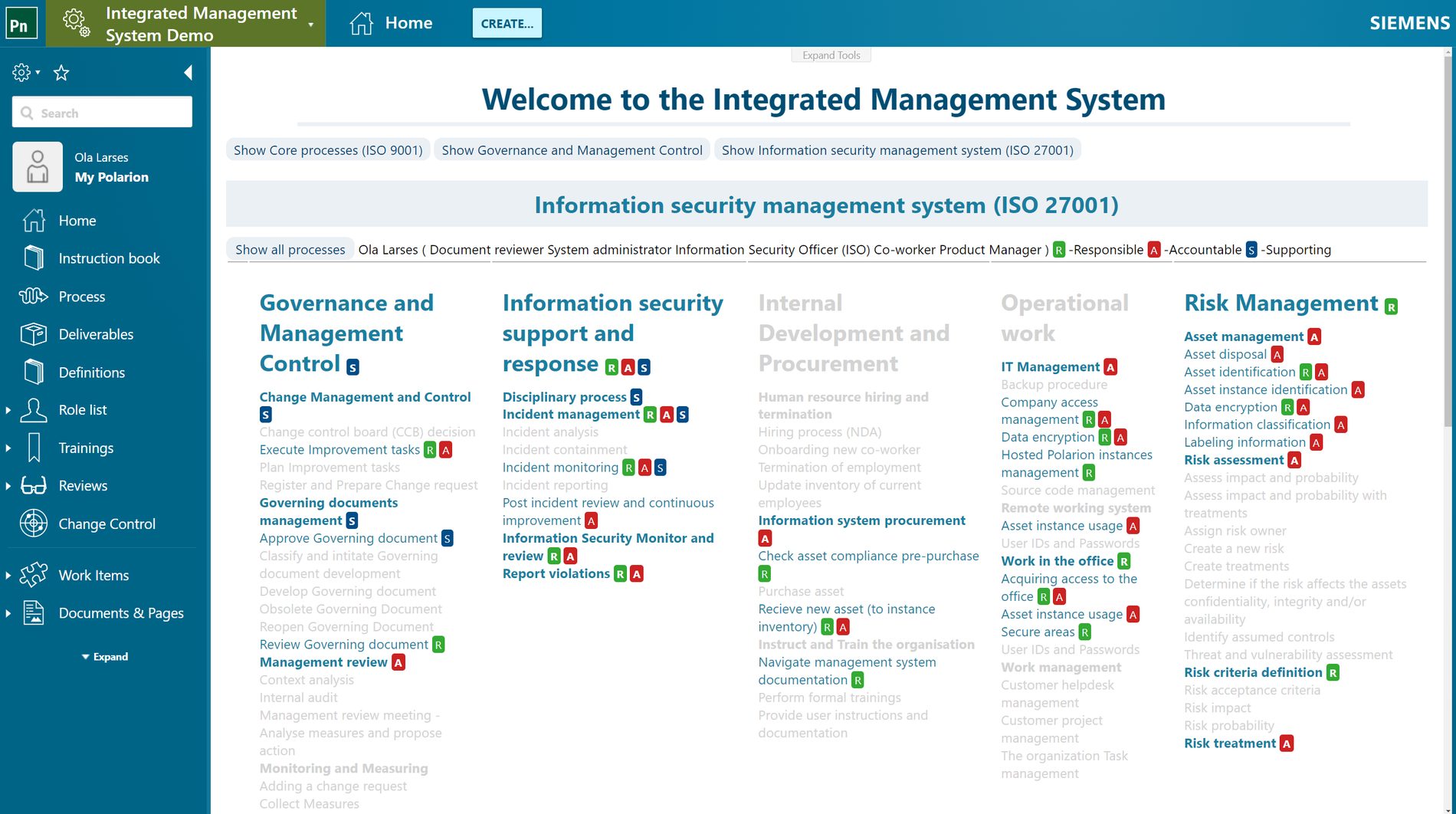
Show people the process where they are standing — the relevant checklist beside the document or work item they have open, instead of a portal they have to remember to visit.
- Instructions authored as LiveDocsChecklists and process instructions live in one central repository and are written, structured and maintained like any other controlled document.
- Review and approval that leaves a recordInstructions go through Polarion's own review workflow. Readers can be shown the latest revision or only the last approved one — their choice, or yours.
- Context-aware displayAn instruction is mapped to the situation it belongs to — document type and status, work item type and status, a report page, a plan — and appears only there. No mapping, no noise.
- Everywhere the work isThe same panel opens in the LiveDoc editor, in table and tree views, and on report pages — so the instruction follows the reader rather than the other way round.
Right for you if your procedures are sound but people don't follow them, and you need the process visible at the point of work without asking anyone to learn a new tool.
Level two
Role-Based Instructions
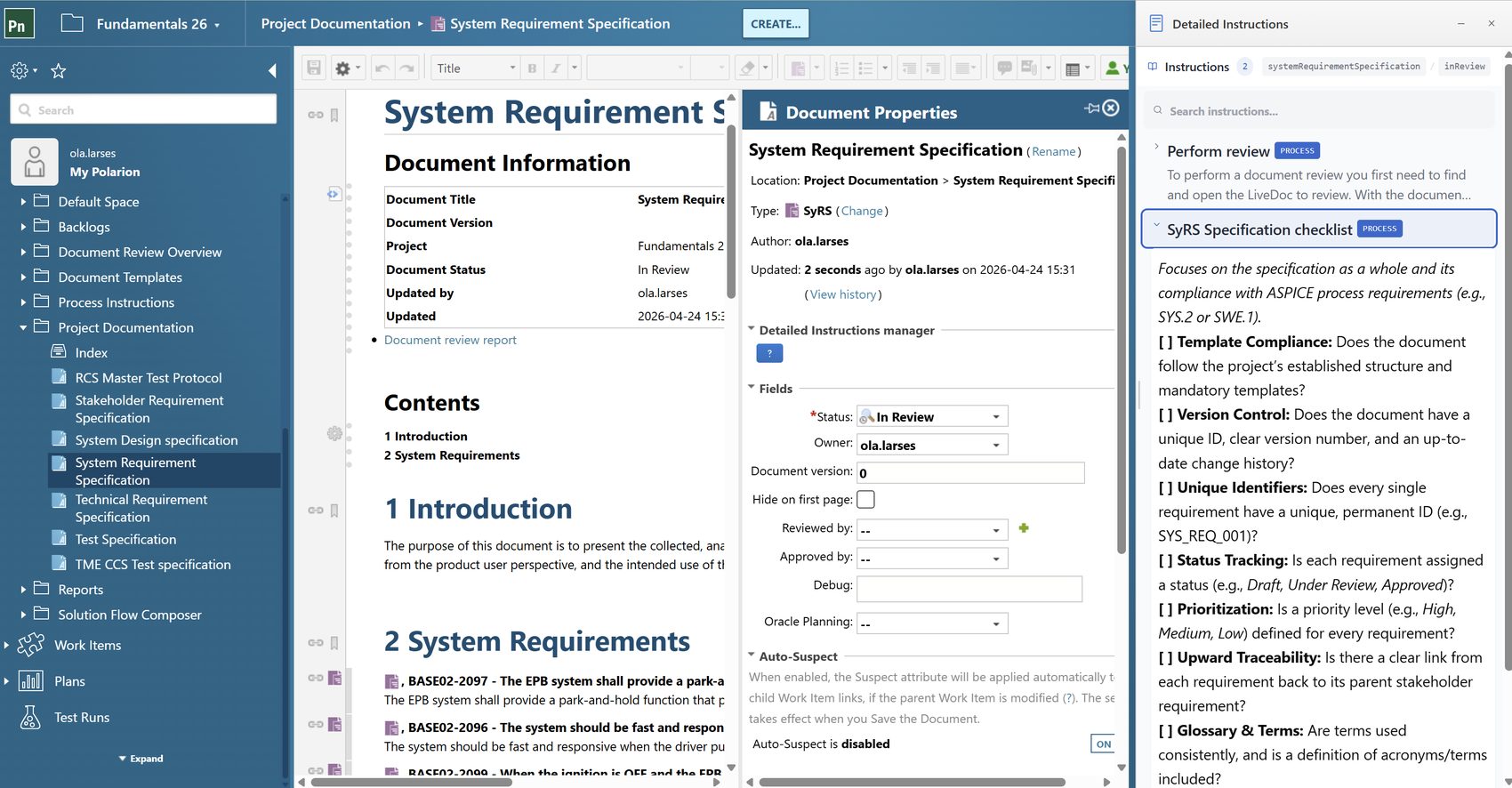
The same system, filtered to the person reading it. Model the processes, define the roles, map who is Responsible and Accountable — and everyone sees their own management system.
- Graphical process modellingProcesses and deliverables drawn in UPN — Universal Process Notation — generated from the work items themselves, so the diagram and the system can never drift apart.
- Process viewer and instruction bookWalk the process tree from the top down, or open the whole thing as a navigable book with search, print and a breadcrumb back to where you were.
- Roles and RASCIDefine process roles once, then map Responsible, Accountable, Supporting, Consulted and Informed onto every process. Assign real users to roles and the mapping becomes personal.
- Role-based filteringOne click hides everything the reader holds no role on. A new joiner sees their job, not the whole corporation.
- Training managementTraining material attached to the process that requires it, mandatory trainings tracked per role, and attendance captured as evidence in auditable form.
Right for you if different functions need different things from the same system, onboarding takes too long, or you have to demonstrate that the people doing the work were trained to do it.
Level three
The Complete IMS
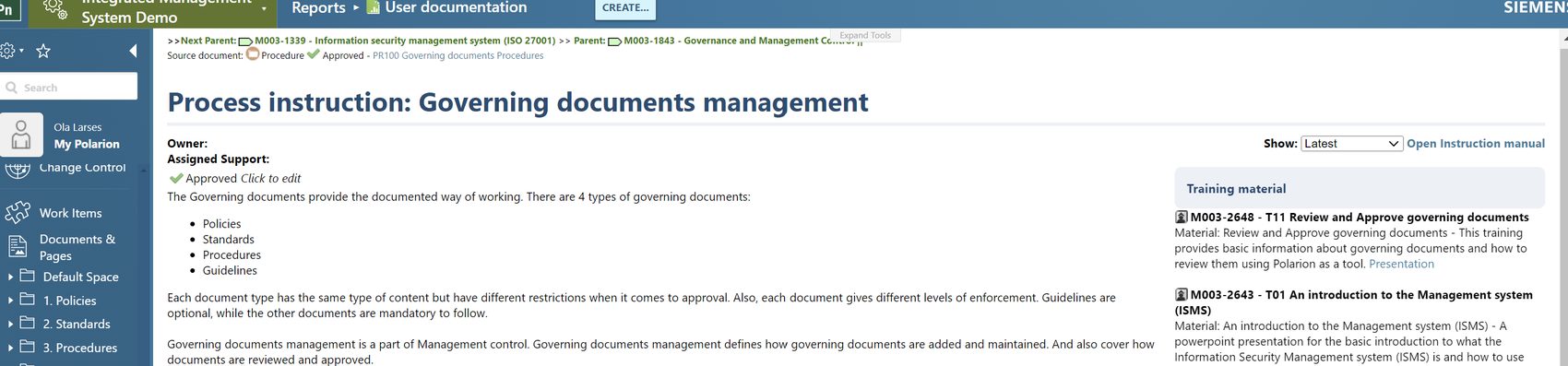
Everything a certification audit asks for, kept current by the organisation's own day-to-day work rather than assembled in the weeks before the auditor arrives.
- Internal audit supportPlan and run internal audits against the processes as modelled, record findings, and drive corrective actions to closure — all linked back to the process that produced them.
- Process modellerBuild and rearrange the process model directly — processes, deliverables, the links between them and the roles on each — without hand-editing work items one at a time.
- Management reviewThe standing agenda — context analysis, measures, audit results, improvement actions — prepared from live data and minuted in the system itself.
- Change controlChange requests against the management system itself, with a change control board decision, an owner and a trail from request to approved revision.
- Tool mapping and measuresRecord which tool supports which process, and attach the measures that show the process is working — from Polarion, or collected from the systems that hold the numbers.
Right for you if you are certified, going for certification, or carrying several standards at once and cannot afford a separate management system for each.
None of these are reports somebody writes for the audit. Each one is the system's ordinary state, queried on the day.
At a glance
What you get at each level
| Capability | EmbeddedLevel 1 | Role-BasedLevel 2 | Complete IMSLevel 3 |
|---|---|---|---|
| Instructions in context | |||
| Instructions and checklists as LiveDocs | |||
| Review and approval support | |||
| Context-embedded views | |||
| Process and people | |||
| Graphical process modelling (UPN) | — | ||
| Process viewer and instruction book | — | ||
| Role definitions and RASCI mapping | — | ||
| User-to-role assignment and filtering | — | ||
| Training management and attendance | — | ||
| Governance and evidence | |||
| Internal audit support | — | — | |
| Process modeller | — | — | |
| Management review | — | — | |
| Change control | — | — | |
| Tool mapping and measures | — | — | |
Every level includes viewer access for your whole Polarion user base.
What changes
Benefits your organisation will notice
A management system earns its keep in daily work, not in the certificate on the wall.
Less noise, faster decisions
Tailored views cut the irrelevant information away and give each stakeholder quick access to the data they actually decide on. People stop searching and start working.
Coordination across departments
One model of who does what, visible to everyone. Handovers between functions stop being a matter of who happens to know the right person.
Onboarding measured in days
A new colleague opens the system, sees their own processes and their mandatory training, and works from the approved instruction instead of from a colleague's memory.
Compliance as a by-product
Performance, compliance and training evidence are tracked as the work happens, so an audit is a query rather than a project.
Continuous improvement that sticks
Change requests, corrective actions and measures live against the processes they concern, so an improvement lands in the way of working rather than in a slide deck.
One system, several standards
Quality, environment, information security and safety share one process model and one set of evidence, viewed through whichever framework the audit calls for.
Frameworks
Built on the vocabulary the standards share
ISO 9000 defines the concepts and terms every management system standard builds on. The IMS is modelled on those concepts, which is why one system can answer to several frameworks at once rather than duplicating itself per certificate.
Template content for ISO 27001 ships today as the Information Security Toolkit; content for further standards is developed with the customer as part of the roll-out.
What you buy
A product, and the help to make it yours
The IMS is licensed as a product and delivered with services, because a management system that isn't your way of working is just more documentation.
The IMS product
Configurations, report pages, server scripts and widgets, plus access to every update and release while the licence runs.
Content
Template content is included at installation. Shaping it to how your organisation actually works is delivered as a service.
Training
Introduction and ongoing training for the administrators and the users of the system.
Support
Second-line product support is part of the licence. First-line Polarion support is available alongside it.
A roll-out that starts with your system, not ours
Extended packages cover the Fundamentals template, management system content development workshops, and the operational risk management template for ISO 27001.
Requirements
Runs on your Polarion
Get started
Ready to make your management system the way you work?
Tell us which level fits where you are today. We will show you the system running, and map what it would take to get your own content into it.